
Introduction
“Looking to automate your business with AI? This TeamPal review shows how you can create a full AI team for different tasks. Learn more today!”
That is exactly what TeamPal is designed to do.
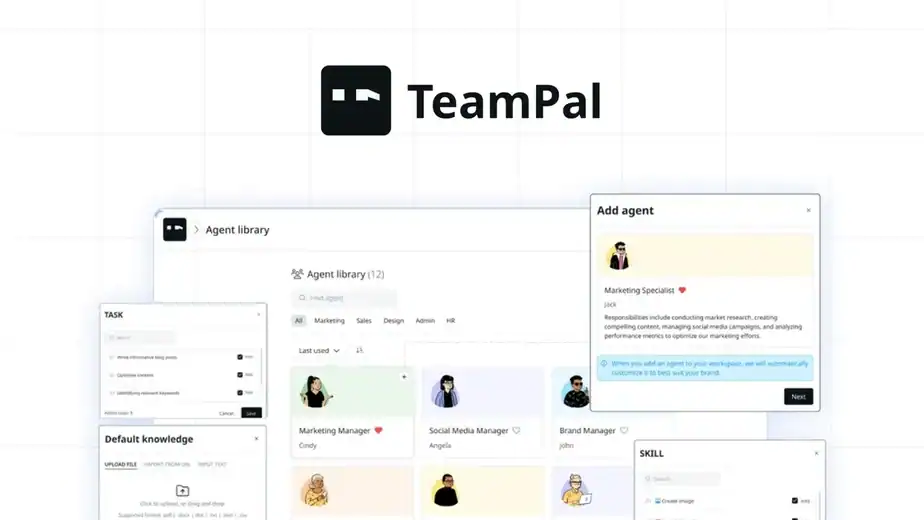
TeamPal allows you to create specialised AI agents for tasks like marketing, research, content writing, customer support, and data analysis without writing a single line of code. Instead of switching between multiple AI tools, you can manage everything from one platform and let your AI agents collaborate like a real team.
Another interesting part is that these agents can learn your brand voice, remember past conversations, and even connect with external tools like Google Sheets and automation platforms.
In this TeamPal Review, I will explain everything you need to know, including its features, use cases, pricing, pros & cons, and whether the lifetime deal is really worth it.
👉 Get the TeamPal Lifetime Deal here:
https://link.katta.co/teampal
Table of Contents
What is TeamPal?
TeamPal is an AI-powered platform that allows users to create and manage a team of virtual AI agents to automate different business tasks. Instead of relying on a single chatbot, TeamPal lets you build multiple specialized AI workers that can handle roles such as marketing, research, content writing, customer support, and data analysis.
The platform is designed to help businesses and creators improve productivity by assigning tasks to AI agents that work together like a real team. Each agent can be customized with its own skills, responsibilities, and knowledge base so it can perform specific tasks more effectively.
Another key capability of TeamPal is its ability to learn about your business. Users can upload documents, share website links, or add information that helps train the AI agents. This allows the agents to understand your brand voice, workflows, and business context, making their responses and outputs more relevant.
In simple terms, TeamPal acts like a virtual workforce powered by AI, where multiple agents collaborate to automate repetitive work and help businesses operate more efficiently.
Why Businesses Need AI Agent Platforms
Many businesses today use AI tools to help with writing, research, marketing, and customer support. But most AI tools work like a single assistant, which means you still have to manage everything yourself.
This is where platforms like TeamPal become useful.
Instead of using one AI tool for everything, businesses can create multiple AI agents, each responsible for a specific task. These agents can work together like a team and help automate daily business operations.
Common Problems Businesses Face
Without an AI agent platform, many businesses struggle with problems like:
- Repetitive tasks taking too much time
- Managing multiple AI tools for different tasks
- Difficulty maintaining consistent brand voice in content
- Lack of automation in workflows
- Limited productivity when working alone or with a small team
These challenges can slow down growth and increase workload for business owners and teams.

How an AI Agent Platform Helps
An AI agent platform like TeamPal helps solve these problems by allowing users to create a virtual team of AI workers.
With TeamPal, businesses can:
- Create specialized AI agents for different roles
- Automate repetitive tasks like content creation and research
- Maintain a consistent brand voice across outputs
- Connect AI agents with external tools and workflows
- Improve productivity without hiring large teams
By using an AI agent platform, businesses can automate routine work and focus more on strategy, creativity, and growth.
Key Feautures of Teampal
TeamPal offers several powerful features that help businesses create and manage a team of AI agents to automate different tasks. The platform is designed to simplify workflows and improve productivity without requiring technical knowledge.
Below are some of the key features that make TeamPal a useful AI productivity platform.
AI Agent Creation
One of the core features of TeamPal is the ability to create specialized AI agents for different roles.
Users can either choose from pre-built templates or create agents from scratch.
With this feature, you can:
- Create AI agents for marketing, research, content writing, and support
- Assign specific tasks and responsibilities to each agent
- Customize how each agent responds and works
This allows businesses to build a virtual AI team that handles multiple tasks.
Brand Voice Training
TeamPal allows users to train AI agents to follow a specific brand voice.
This means the AI can generate content that matches your communication style.
For example, you can set your brand tone as:
- Professional
- Friendly
- Technical
- Casual
Once configured, every AI agent will maintain the same voice across all outputs.
Workspace Management
TeamPal provides workspace management features that allow users to organize projects and teams efficiently.
Users can:
- Create multiple workspaces for different projects
- Manage AI agents within each workspace
- Collaborate with team members
This is especially useful for agencies managing multiple clients.

Knowledge Base Training
Users can upload documents or add website links to train AI agents.
This helps the AI understand your business information and generate better responses.
Supported knowledge sources include:
- Documents and PDFs
- Website URLs
- Business guidelines
- Internal company data
This feature allows agents to work with business-specific knowledge.
AI Workflow Automation
TeamPal also includes workflow automation tools that help users automate repetitive tasks.
Users can:
- Build automation workflows
- Connect multiple steps together
- Create content distribution workflows
This helps businesses reduce manual work and improve efficiency.
Agent Collaboration (Group Chat)
A unique feature of TeamPal is the ability to let multiple AI agents collaborate in one conversation.
This means different agents can work together on a task.
For example:
- A research agent gathers information
- A writer agent creates content
- An SEO agent optimizes the article
This collaboration works like a virtual team meeting.
Built-In AI Plugins
TeamPal also includes built-in plugins that expand the capabilities of AI agents.
These plugins allow agents to:
- Perform web searches
- Generate images
- Analyze data
- Create and read documents
This makes the platform more powerful and versatile.
How TeamPal Works
Using TeamPal is simple. The platform is designed to help users create and manage a team of AI agents that can automate different business tasks.
Below is a simple step-by-step overview of how TeamPal works.
1. Create Your Workspace
The first step is setting up your workspace inside TeamPal.
A workspace helps you organize your projects and AI agents in one place. You can also create multiple workspaces for different businesses or clients.
Inside the workspace, you can:
- Manage AI agents
- Upload documents and data
- Organize workflows
- Collaborate with team members
2. Create AI Agents
Once your workspace is ready, you can start creating AI agents.
TeamPal provides 80+ ready-made templates for different business roles, so you don’t have to build everything from scratch.
You can create agents for tasks like:
- Content writing
- Marketing strategy
- Research and analysis
- Customer support
- Social media management
Each agent can be customized with its own role and responsibilities.
3. Train Agents with Your Knowledge
TeamPal allows you to train your AI agents so they understand your business better.
You can upload different types of information such as:
- Documents and PDFs
- Website links
- Business guidelines
- Company knowledge base
This helps the AI generate responses and content that match your business context and brand voice.
4. Assign Tasks to AI Agents
After setting up and training the agents, you can start assigning tasks.
For example, you can ask your agents to:
- Generate blog content
- Analyze market data
- Create social media posts
- Summarize documents
Agents can complete tasks individually or collaborate with other agents.
5. Automate Workflows
TeamPal also allows you to automate workflows.
You can connect different steps to create automated processes, such as:
- Content creation workflows
- Social media publishing
- Data analysis and reporting
This reduces manual work and improves productivity.
6. Manage and Improve Your AI Team
As you continue using the platform, your AI agents remember previous conversations and improve over time.
You can:
- Adjust agent roles
- Update knowledge bases
- Add new workflows
- Optimize task performance

If you want to try building your own AI team, you can explore the lifetime deal here:
👉 Get the TeamPal Lifetime Deal:
https://link.katta.co/teampal
Benefits of Using TeamPal
Using TeamPal can help businesses automate tasks, improve productivity, and manage workflows more efficiently. Instead of relying on a single AI tool, TeamPal allows users to build a team of specialized AI agents that can handle different responsibilities.
Automates Repetitive Tasks
One of the biggest benefits of TeamPal is automation. Many daily business tasks take time and effort when done manually.
With TeamPal, users can automate tasks such as:
- Content creation
- Market research
- Social media posts
- Data analysis
This saves time and allows teams to focus on more strategic work.
Build a Virtual AI Team
TeamPal allows users to create multiple AI agents that work like a virtual team.
Each agent can be assigned a specific role such as:
- Content writer
- SEO specialist
- Marketing assistant
- Customer support agent
This helps businesses manage multiple tasks at the same time without hiring additional staff.
Maintain Consistent Brand Voice
Consistency is important when creating content or communicating with customers.
TeamPal allows users to train agents to follow a specific brand voice. Once configured, all AI-generated content will maintain the same tone and style.
This helps businesses keep their messaging professional and consistent.
Improves Productivity
By delegating tasks to AI agents, businesses can complete work faster and more efficiently.
TeamPal helps users:
- Reduce manual workload
- Complete tasks quickly
- Manage multiple projects simultaneously
This improves overall productivity for individuals and teams.
Easy to Use Without Coding
Another major benefit of TeamPal is that it does not require technical skills.
Users can easily create AI agents using templates and simple settings. This makes the platform accessible for:
- Small business owners
- Freelancers
- Content creators
- Marketing teams
Scalable for Growing Businesses
As businesses grow, their workload also increases. TeamPal makes it easier to scale operations without increasing costs.
Businesses can simply create more AI agents to handle additional tasks and workflows.
If you want to build your own AI team and automate your business tasks, you can explore the lifetime deal here
👉 https://link.katta.co/teampal
Pros and Cons of TeamPal
Like any productivity platform, TeamPal also comes with both advantages and a few limitations. Understanding these will help you decide whether the tool fits your workflow and business needs.
Pros ✅
✅ Create a custom AI workforce without coding
✅ 80+ ready-made AI agent templates for different roles
✅ Automates tasks across marketing, sales, HR, and operations
✅ Train AI agents using your own documents and data
✅ Real-time collaboration with team members
✅ Supports powerful AI models like GPT-4 and Gemini
Cons ❌
❌ Initial setup may take time for beginners
❌ Some advanced AI features depend on plan limits
❌ May feel complex for users who only need simple automation
❌ Internet connection required since it is cloud-based
Despite these limitations, many businesses find TeamPal extremely useful for building a team of AI agents that can automate tasks, improve productivity, and handle multiple workflows efficiently.
TeamPal Pricing
TeamPal offers multiple pricing tiers depending on the number of AI agents, knowledge storage, and AI credits.
The tool is available as a lifetime deal on AppSumo, meaning you pay once and get long-term access instead of paying monthly subscriptions.
Here are the main license tiers available.

Who Should Use TeamPal?
TeamPal is designed for individuals and businesses that want to automate tasks using AI agents and improve productivity.
Marketing Teams
Marketing teams can create AI agents to handle:
- Content writing
- SEO research
- Social media content
- Campaign planning
This helps teams produce more content while saving time.
Small Business Owners
Small businesses often have limited staff. TeamPal allows them to build a virtual AI workforce that can handle multiple tasks without hiring additional employees.
Freelancers
Freelancers can use TeamPal to automate tasks like:
- Research
- Content creation
- Client communication
- Workflow management
This helps them complete projects faster.
Agencies
Marketing agencies and digital service providers can create AI agents for different departments such as:
- Content marketing
- Customer support
- Data research
- Strategy planning
Virtual Assistants
Virtual assistants can use TeamPal to automate repetitive tasks and improve productivity when managing multiple clients.
If you want to build your own AI-powered workforce and automate business tasks, you can explore the deal here:
👉 https://link.katta.co/teampal
Real Use Cases of TeamPal
TeamPal can be used in many real-world business scenarios. By creating specialized AI agents for different tasks, businesses can automate workflows, improve productivity, and reduce manual work.
Here are some practical ways people are using TeamPal.
Content Creation and Marketing
Marketing teams and creators can build AI agents to help with:
• Blog writing
• Social media content creation
• Email marketing campaigns
• Content research and topic ideas
This helps teams produce more content consistently while saving time.
Customer Support Automation
Businesses can create AI agents to assist with customer support tasks such as:
• Answering common customer questions
• Providing product information
• Managing support documentation
• Assisting customer service teams
This improves response time and customer experience.
Market Research and Data Analysis
Companies often spend hours collecting and analyzing data. TeamPal agents can help automate tasks like:
• Competitor research
• Market trend analysis
• Data summarization
• Research report generation
This helps businesses make better decisions faster.
Business Operations Automation
TeamPal can also support everyday business operations by automating routine workflows.
Examples include:
• Document summarization
• Task automation
• Internal knowledge management
• Team productivity workflows
This reduces repetitive work and improves operational efficiency.
AI Team for Small Businesses
Small business owners can create a virtual AI workforce where different agents handle different roles such as:
• Marketing assistant
• Research assistant
• Content writer
• Strategy planner

This allows businesses to scale operations without hiring a large team.
If you want to build your own AI-powered team and automate business workflows, you can explore the latest deal here:
👉 https://link.katta.co/teampal
Here are the remaining sections for your TeamPal article written in the same simple, human-readable style with short paragraphs and bullet points (just like your BuildIn article). Also included a natural place for your affiliate link.
TeamPal Integrations
TeamPal works well with different tools and platforms to help businesses automate workflows and connect their AI agents with existing systems.
These integrations allow teams to streamline operations, share data between tools, and build more powerful automation processes.
Some useful integration capabilities include:
API Integration
TeamPal provides API support that allows businesses to connect the platform with their internal tools, applications, and databases.
This helps companies automate workflows and build customized AI solutions.
Workflow Automation Tools
TeamPal can connect with automation platforms that allow users to create automated workflows between different apps.
For example, businesses can automate:
• Data collection from external tools
• Sending notifications or updates
• Connecting AI agents with productivity platforms

Knowledge Base Integrations
Users can connect TeamPal with their internal documents and knowledge bases so AI agents can use that information to perform tasks or answer questions.
This helps teams build smarter AI assistants using their own business data.
These integrations help businesses create a fully automated AI-powered workflow system.
TeamPal Alternatives
Although TeamPal is a powerful AI automation platform, there are several tools that offer similar AI capabilities.
Here are some popular alternatives.
Custom GPTs
Custom GPTs allow users to create personalized AI assistants using OpenAI’s platform. They can perform tasks such as answering questions, generating content, and automating workflows.
However, they usually require more manual setup compared to dedicated AI agent platforms.
AutoGPT
AutoGPT is designed to automate tasks using AI agents that can perform actions independently.
It is often used for research automation, data analysis, and advanced AI workflows.
AgentGPT
AgentGPT allows users to create autonomous AI agents that can complete tasks with minimal human input.
It focuses on automation and task execution.
Zapier AI
Zapier also offers AI-powered automation that connects different applications and automates workflows.
Each of these tools offers different strengths, but TeamPal focuses on creating a complete AI workforce where multiple agents work together as a team.
If you want to explore TeamPal and see how it works, you can check it here:
👉 https://link.katta.co/teampal
TeamPal vs Custom GPTs
Both TeamPal and Custom GPTs allow users to build AI assistants, but they are designed for slightly different purposes.
TeamPal
• Designed to create multiple AI agents working together
• Built for team collaboration and business workflows
• Allows role-based AI agents (researcher, marketer, analyst, etc.)
• Helps automate business operations
Custom GPTs
• Focuses on building single AI assistants
• Best for personal productivity and simple automation
• Requires manual setup for workflows
• Limited multi-agent collaboration features
In simple terms, Custom GPTs act like one AI assistant, while TeamPal helps you build an entire AI team that can work together.
TeamPal vs Traditional AI Tools
Many people use traditional AI tools like chatbots or writing assistants for basic tasks.
However, TeamPal offers a more advanced approach.
Traditional AI Tools
• Focus mainly on text generation
• Work as single chat assistants
• Limited automation capabilities
• Usually handle one task at a time
TeamPal
• Creates multiple AI agents with different roles
• Automates complex workflows
• Helps manage business operations
• Allows teams to build a virtual AI workforce
This makes TeamPal more suitable for business automation and productivity rather than just content generation.
Is TeamPal Worth It?
If your business spends a lot of time on repetitive tasks such as research, content creation, data analysis, and workflow management, TeamPal can be a valuable tool.
Instead of doing everything manually, you can create specialized AI agents to handle different responsibilities.
TeamPal is especially useful for:
• Marketing teams
• Content creators
• Startups and small businesses
• Agencies managing multiple workflows
• Entrepreneurs looking to automate operations
By building an AI team that works 24/7, businesses can increase productivity and reduce operational workload.
If you want to explore the platform and check the latest deal, you can access it here:
👉 https://link.katta.co/teampal
What Users Are Saying About TeamPal
Users generally appreciate TeamPal for its ability to create multiple AI agents that work together like a team.
Here are some common feedback points.
What Users Like
✅ Ability to build a full AI team with different roles
✅ Helps automate repetitive business tasks
✅ Improves productivity and workflow management
✅ Easy way to scale operations without hiring more staff
✅ Flexible AI automation capabilities
Areas for Improvement
❌ Requires time to properly configure AI agents
❌ Some advanced workflows may require technical knowledge
❌ Integrations may still be expanding
Overall, many users see TeamPal as a powerful tool for businesses looking to automate work using AI agents.
Final Verdict
After reviewing its features, use cases, and capabilities, TeamPal stands out as a powerful AI automation platform designed to build a virtual AI workforce.
Instead of using a single AI assistant, TeamPal allows users to create multiple AI agents that work together to handle different business tasks.
This makes it particularly useful for:
• Businesses looking to automate workflows
• Teams managing multiple projects
• Entrepreneurs who want to scale operations efficiently
• Agencies handling repetitive tasks
If you want to experience how AI agents can transform your workflow, TeamPal is definitely worth exploring.
👉 Check the TeamPal deal here:
https://link.katta.co/teampal