
Introduction
Managing notes, documents, projects, and ideas across multiple tools can quickly become overwhelming. you can easily understand by this BuildIn Review
Many creators, freelancers, and small teams rely on separate apps for note-taking, project management, databases, and collaboration. Over time, switching between these tools can slow down productivity and create scattered information.
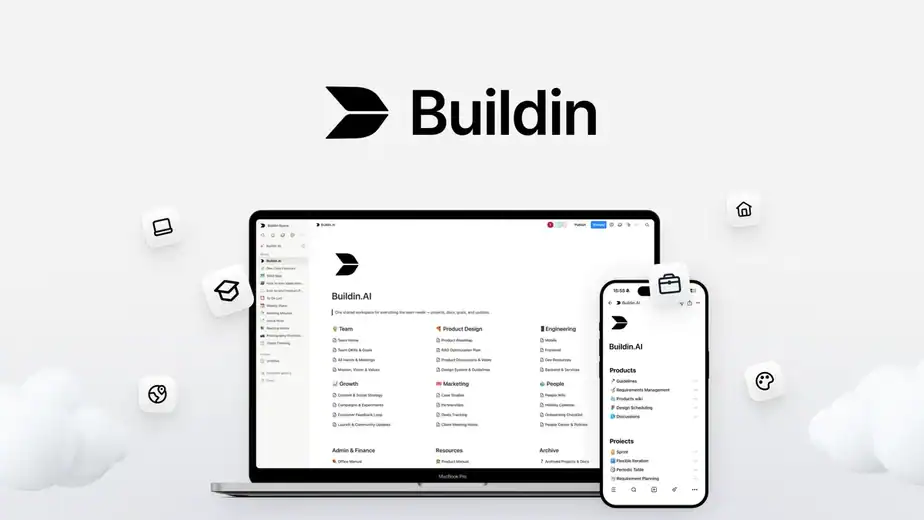
It is an AI-powered workspace that combines documents, databases, mind maps, and project management in a single environment. In addition, it includes built-in AI assistance and content monetization features that allow users to sell their knowledge directly from the workspace.
With Buildin.AI, users can:
• organize notes and documents
• manage projects and team collaboration
• build structured databases
• create mind maps for planning
• publish and sell digital content
👉 If you want to explore the platform, you can check the latest Buildin.AI lifetime deal here:
https://link.katta.co/buildin
In this detailed Buildin.AI review, we will explore its features, pricing, pros and cons, real use cases, and alternatives to help you decide whether this tool fits your workflow.
Table of Contents
What is BuildIn.ai?
BuildIn.ai is an AI-powered productivity and knowledge management platform that helps individuals and teams capture ideas, organize information, and collaborate in one centralized workspace. It combines features like note-taking, databases, task management, and AI assistance so users can store and manage their knowledge efficiently.
Instead of using separate tools for documents, notes, and project planning, BuildIn brings everything together in one platform. Users can create pages, organize them into databases, add documents, and easily search through their information whenever needed. This makes it easier to keep ideas, research, and project materials structured and accessible.
One of the key advantages of BuildIn is its AI-powered assistance. The AI can help users generate content outlines, improve writing, summarize information, and even suggest ideas while working. As you continue using the platform, it can adapt to your workflow and provide more personalized suggestions to improve productivity.
In simple terms, BuildIn works as an all-in-one digital workspace where you can write notes, manage projects, organize knowledge, and collaborate with your team while using AI to make the process faster and more efficient.
Why Businesses Need a Knowledge Management Tool
In many businesses today, information is scattered everywhere. Teams store files in emails, documents, spreadsheets, and different tools. Because of this, it becomes difficult to find important information when it is needed.
This is where a knowledge management platform like BuildIn.ai becomes very useful.
Instead of storing information in different places, businesses can keep everything organized in one central workspace.
Common Problems Businesses Face
Without a proper knowledge management system, companies often face problems like:
- Important documents getting lost in multiple folders
- Teams wasting time searching for information
- Lack of proper collaboration between team members
- Duplicate work because knowledge is not shared
- Difficulty managing projects and research data
These problems reduce productivity and slow down team performance.
How a Knowledge Management Tool Helps
A tool like BuildIn helps businesses solve these problems by providing:
- Centralized information storage for documents, notes, and files
- Easy collaboration between team members
- Better organization of knowledge and ideas
- Quick search to find information instantly
- Improved productivity by keeping everything in one place
By using a knowledge management platform, businesses can work more efficiently and ensure that important knowledge is always accessible to the team.
Key Features of BuildIn
BuildIn.ai comes with several powerful features that help individuals and teams organize information, collaborate efficiently, and improve productivity.
Below are some of the key features that make BuildIn a useful knowledge management and productivity tool.
AI-Powered Writing Assistance
BuildIn includes built-in AI tools that help users create and improve content directly inside the platform.
With this feature, you can:
- Generate ideas and outlines for documents
- Improve writing quality
- Summarize long notes or articles
- Get suggestions while writing
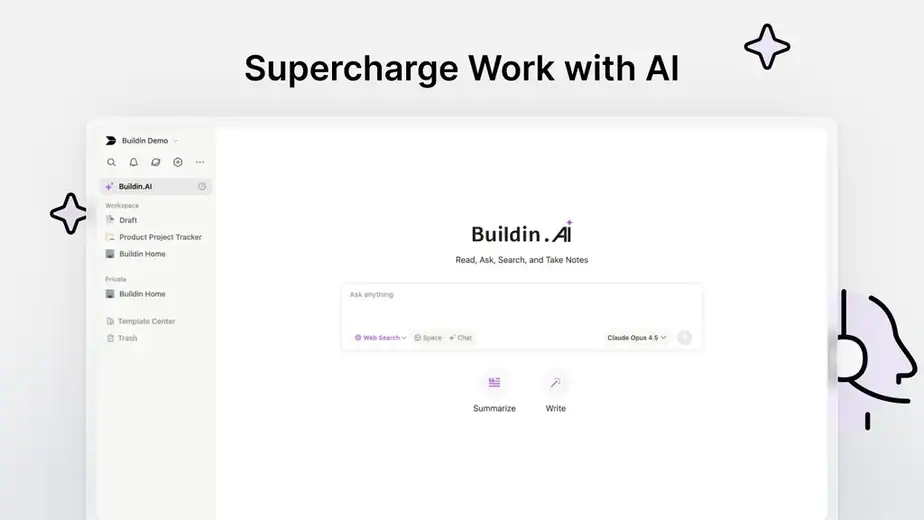
This helps users save time and create content more efficiently.
All-in-One Knowledge Workspace
BuildIn works as a centralized workspace where teams can store all their information.
Users can manage:
- Notes
- Documents
- Research materials
- Project information
- Important resources
Keeping everything in one place makes it easier for teams to find and manage information.
Database and Structured Content
Another useful feature of BuildIn is its ability to organize information in databases.
Users can create structured content such as:
- Project trackers
- Task lists
- Knowledge bases
- Content calendars
This helps teams manage large amounts of information in an organized way.
Real-Time Team Collaboration
BuildIn allows multiple team members to work together in the same workspace.
Teams can:
- Edit documents together
- Share knowledge across departments
- Comment and discuss ideas
- Collaborate on projects in real time
This improves communication and teamwork.
Powerful Search and Organization
As information grows, finding the right document can become difficult. BuildIn solves this with a powerful search system.
Users can quickly search and locate:
- Notes
- Files
- Documents
- Knowledge pages
This ensures important information is always easy to access.
Flexible Workspace Customization
BuildIn allows users to organize their workspace based on their workflow.
Users can:
- Create custom pages and folders
- Organize information in different formats
- Design personalized workspaces for projects
This flexibility makes the platform suitable for both individuals and teams.
How BuildIn.ai Works
Using BuildIn.ai is simple. The platform is designed to help individuals and teams organize information, manage projects, and collaborate efficiently in one workspace.
Below is a simple step-by-step overview of how BuildIn works.
1. Create Your Workspace
The first step is creating a workspace where all your information will be stored.
In this workspace, you can organize:
- Notes
- Documents
- Databases
- Project files
- Knowledge resources
This workspace becomes the central place where your team can manage and access important information.
2. Add Pages, Notes, and Databases
Once your workspace is ready, you can start creating pages to organize your information.
You can create different types of content such as:
- Knowledge base articles
- Project documentation
- Research notes
- Task trackers
- Content calendars
BuildIn also allows you to create databases, which help organize information in a structured format.
3. Use AI to Generate and Improve Content
BuildIn includes built-in AI features that help users work faster.
You can use AI to:
- Generate ideas or outlines
- Improve writing quality
- Summarize long content
- Organize information more efficiently
This makes it easier to manage large amounts of information without spending too much time manually editing content.

4. Collaborate with Your Team
One of the biggest advantages of BuildIn is team collaboration.
Multiple team members can:
- Edit documents together
- Share knowledge in real time
- Leave comments and suggestions
- Work on projects simultaneously
This helps teams stay aligned and work more efficiently.
5. Search and Access Information Easily
As your workspace grows, BuildIn helps you quickly find the information you need.
With its search feature, you can easily locate:
- Documents
- Notes
- Files
- Knowledge pages
This ensures that important information is always accessible when needed.
Benefits of Using BuildIn.ai
Using BuildIn.ai can greatly improve how individuals and teams organize information, collaborate, and manage their work. The platform brings together documentation, databases, and AI tools in one place to simplify daily workflows.
Centralized Knowledge Management
One of the biggest benefits of BuildIn is that it keeps all your information in one place.
Instead of using different tools for documents, notes, and projects, everything can be organized inside a single workspace.
Teams can store:
- Documents
- Notes
- Research materials
- Project files
This makes it easier to find information and avoid losing important data.
Improved Productivity with AI
BuildIn includes built-in AI tools that help users create and manage content faster.
The AI can help with tasks like:
- Generating content ideas
- Summarizing long notes or documents
- Improving writing quality
- Organizing complex information
This saves time and reduces manual work.
Better Team Collaboration
BuildIn allows team members to collaborate inside the same workspace.
Teams can:
- Edit documents together in real time
- Share ideas and information
- Leave comments and feedback
- Work on projects simultaneously
This helps teams stay connected and work more efficiently.
Organized Information and Easy Search
As your knowledge base grows, it becomes important to find information quickly.
BuildIn provides tools to organize information using pages and databases so users can easily structure their content.
With its search feature, users can quickly find:
- Notes
- Documents
- Files
- Knowledge pages
This makes accessing information much easier.
All-in-One Productivity Workspace
Another major benefit of BuildIn is that it combines multiple productivity features into one platform.
Users can manage:
- Documentation
- Knowledge bases
- Project information
- Databases
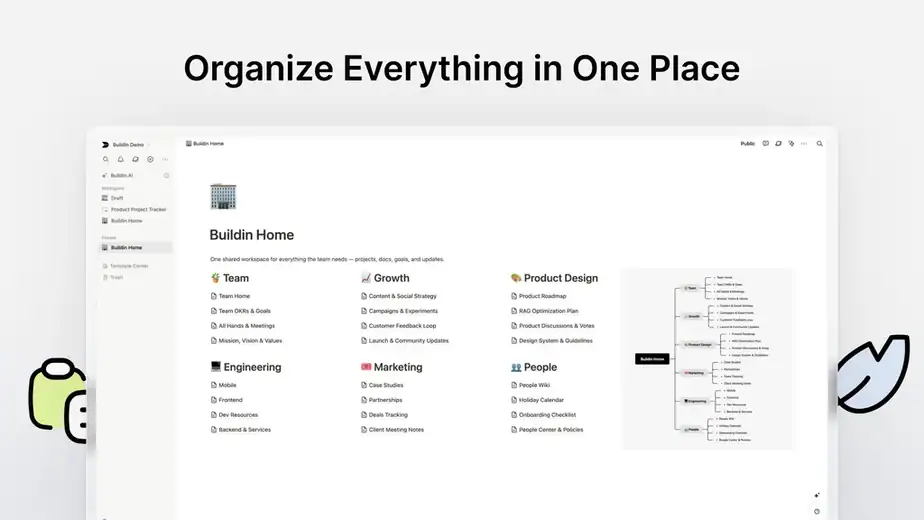
Having everything in one place reduces the need to switch between multiple tools.
If you want to explore this platform and see how it can help organize your workflow, you can check it here
👉 https://link.katta.co/buildin
Pros and Cons of BuildIn.ai
Every tool has its strengths and limitations. BuildIn.ai offers many useful features for organizing information and improving productivity, but there are also a few things to consider before using it.
Pros ✅
✅ AI-powered knowledge management and workspace
✅ Combines notes, documents, databases, and collaboration in one place
✅ Easy organization using folders, pages, and databases
✅ Real-time team collaboration features
✅ Built-in AI assistant for writing, summarizing, and brainstorming
✅ Flexible workspace customization for different workflows
Cons ❌
❌ New users may need time to understand the workspace structure
❌ Some advanced features depend on the pricing plan
❌ Limited integrations compared to some older productivity tools
❌ Requires internet connection since it is cloud-based
❌ May feel complex for users who only need simple note-taking tools
BuildIn AI Pricing
BuildIn.ai offers multiple pricing options depending on the number of users, storage, and AI usage.
Currently, the platform is available as a lifetime deal on AppSumo, which means you only pay once and get long-term access without a monthly subscription.
Here are the available license tiers:

Who Should Use BuildIn AI?
BuildIn AI is designed for individuals and teams who want to organize knowledge, manage projects, and collaborate in one platform.
Small Business Owners
Small businesses often use multiple tools for documentation, project management, and knowledge sharing. BuildIn brings everything together in one workspace.
Content Creators
Creators can use BuildIn to:
- Organize content ideas
- Manage research notes
- Create knowledge libraries
- Monetize premium content
Marketing Teams
Marketing teams can use the platform to manage campaigns, store marketing resources, and collaborate with team members.
Freelancers
Freelancers can use BuildIn to manage projects, organize client information, and store documentation in a structured way.
Remote Teams
Teams working remotely can collaborate on documents, manage projects, and share knowledge in a centralized workspace.
Real Use Cases of BuildIn AI
BuildIn.ai can be used in many real-world scenarios by individuals, teams, and businesses. Since it combines documents, databases, notes, and collaboration tools in one platform, it helps users manage knowledge and workflows more efficiently.
Here are some practical use cases of BuildIn AI.
Knowledge Base Management
Many companies struggle with scattered documentation stored in multiple tools. BuildIn AI allows teams to create a centralized knowledge base where they can store policies, guides, training materials, and documentation in one place.
This helps teams quickly find important information without searching through multiple tools.
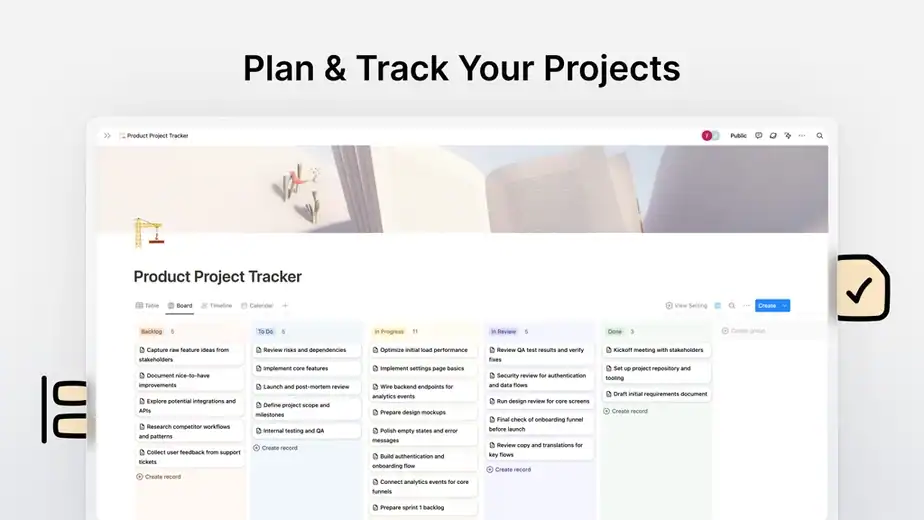
Project Management
BuildIn AI can also be used to manage projects and tasks. Teams can create project pages, track tasks, assign responsibilities, and monitor progress using databases and timelines.
This makes it easier to organize project workflows and improve team coordination.
Team Collaboration
Remote and distributed teams can collaborate in real time by editing documents, sharing files, and adding comments within the same workspace.
This reduces the need to switch between different tools for communication and project documentation.
Personal Knowledge Management
Individuals such as freelancers, researchers, and students can use BuildIn AI to organize notes, research materials, and ideas.
The AI assistant can help summarize content, generate ideas, and structure information for better productivity.
Content Creation and Idea Management
Content creators and marketers can use BuildIn AI to manage content ideas, writing drafts, and research materials in one place.
They can also use the AI features to generate outlines, improve writing, and organize creative ideas more efficiently.
Research and Documentation
Research teams and analysts can store research materials, data references, and documentation in structured databases. This makes it easier to access information and collaborate with team members during research projects.
If you want to organize knowledge, manage projects, and collaborate with your team in one AI-powered workspace, you can explore the latest deal here:
👉 https://link.katta.co/buildin
BuildIn Integrations
BuildIn.ai integrates with multiple tools and automation platforms to help users streamline workflows and connect their workspace with other applications.
These integrations allow teams to automate tasks, share information across platforms, and manage their work more efficiently.
Some of the important integrations include:
Zapier Integration
BuildIn can connect with Zapier, allowing users to automate workflows between BuildIn and thousands of other applications.
For example, users can:
• Automatically create tasks when a database item is added
• Send notifications to communication tools
• Sync data between apps
Zapier makes it possible to connect BuildIn with 8,000+ apps without coding.
Slack Integration
Teams can integrate BuildIn with Slack to receive notifications, updates, and task alerts directly inside Slack channels.
This improves communication and keeps teams updated on project progress.
Gmail Integration
BuildIn can also connect with Gmail through automation platforms, helping users automate email-related workflows and manage communications more efficiently.
Workflow Automation Platforms
Using integration tools like Albato, BuildIn can connect with 1000+ applications, including CRM tools, marketing platforms, and productivity apps.
This allows businesses to create powerful automation workflows and connect BuildIn with their existing tech stack.
These integrations make BuildIn a flexible workspace that can easily fit into different business workflows.
BuildIn Alternatives
Although BuildIn is a powerful workspace platform, several other tools offer similar features for knowledge management, documentation, and collaboration.
Here are some popular alternatives:
Notion
Notion is one of the most well-known productivity platforms for note-taking, documentation, and database management.
It allows teams to manage projects, create wikis, and organize knowledge in a flexible workspace.
Coda
Coda combines documents, spreadsheets, and automation tools into one platform.
It is often used by teams that want advanced database functionality with automation features.
ClickUp
ClickUp focuses more on project management and task tracking while still providing document collaboration and team communication tools.
Airtable
Airtable is another powerful alternative that combines spreadsheets and databases for managing structured data and projects.
Each of these tools has its own strengths, but BuildIn stands out because it combines documents, databases, mind maps, and AI features in a single workspace.
BuildIn vs Notion
Both BuildIn.ai and Notion are powerful productivity platforms designed to help users organize knowledge, manage projects, and collaborate with teams.
However, there are some key differences.
AI Capabilities
BuildIn focuses more on AI-powered productivity features such as content generation, summarization, and intelligent knowledge management.
Notion also offers AI features, but many advanced capabilities are available only in higher-tier plans.
Workspace Structure
Both tools allow users to create documents, databases, and knowledge bases.
However, BuildIn also includes mind maps, subscription content management, and knowledge monetization features, which are not common in most productivity tools.
Content Monetization
One unique feature of BuildIn is the ability to sell knowledge products, templates, and premium content directly inside the platform.
This makes it attractive for creators who want to monetize their knowledge.
Ease of Migration
BuildIn supports direct migration from Notion, allowing users to import pages and databases without losing structure.
Which One Should You Choose?
• Choose BuildIn if you want an AI-powered workspace with knowledge monetization features.
• Choose Notion if you prefer a widely used productivity tool with a large ecosystem and community.
BuildIn vs Traditional Documentation Tools
Many teams still rely on traditional documentation tools like Google Docs, spreadsheets, and basic note-taking apps to manage information. However, these tools often lack structure, automation, and advanced collaboration features.
BuildIn AI solves many of these problems by combining documentation, databases, project management, and AI tools in a single workspace.
Here is a simple comparison.
Traditional Documentation Tools
• Documents stored in multiple platforms
• Limited collaboration features
• Difficult to organize large knowledge bases
• No built-in AI assistance
• Hard to connect documentation with tasks and projects
BuildIn AI
• Centralized workspace for docs, notes, projects, and databases
• Real-time collaboration and team editing
• AI-powered writing, summarization, and research assistance
• Built-in knowledge management system
• Ability to convert notes into structured workflows and tasks
Because of these capabilities, BuildIn works more like an all-in-one knowledge and productivity platform, rather than just a simple documentation tool.
If you want to explore the platform and see how it works, you can check it here:
👉 https://link.katta.co/buildin
Is BuildIn Worth It?
If you frequently work with documents, knowledge bases, projects, and collaboration tools, BuildIn can be a very valuable platform.
Instead of switching between multiple tools like Google Docs, project managers, and note-taking apps, BuildIn brings everything together into one workspace.
It is especially useful for:
• Teams managing large amounts of documentation
• Content creators building knowledge libraries
• Freelancers organizing client projects
• Businesses managing internal knowledge bases
Another major advantage is that BuildIn includes AI features, databases, mind maps, and document collaboration inside one platform, reducing the need for multiple productivity tools.
If you are looking for an AI-powered workspace similar to Notion but with additional features like knowledge monetization and mind maps, BuildIn can definitely be worth trying.
What Users Are Saying About BuildIn
Users generally appreciate BuildIn for its ability to combine multiple productivity tools in one platform.
Some common feedback from users includes:
What Users Like
✅ Clean and flexible workspace for organizing knowledge
✅ AI tools help summarize documents and generate content
✅ Combines docs, tasks, and databases in one platform
✅ Real-time collaboration with team members
✅ Easy migration from tools like Notion
Many users also like the ability to structure ideas using mind maps and convert them into tasks or documents, which helps teams manage projects more efficiently.
Areas for Improvement
❌ Smaller integration ecosystem compared to some competitors
❌ Learning curve for new users
❌ Some advanced AI features depend on usage limits
Overall, BuildIn is considered a powerful productivity workspace for teams and creators who want everything in one place.
Final Verdict
After reviewing its features, pricing, and real-world use cases, BuildIn AI stands out as a powerful all-in-one workspace for knowledge management and collaboration.
The platform combines multiple productivity tools such as:
• Documentation
• Databases
• Project management
• AI writing tools
• Knowledge organization
Instead of using several separate tools, BuildIn allows teams to manage their projects, knowledge, and collaboration from a single platform.
For creators, freelancers, and businesses looking for an AI-powered productivity workspace, BuildIn is definitely worth considering.
If you want to try the platform and check the latest lifetime deal, you can explore it here:
👉 https://link.katta.co/buildin